Sales live in four WhatsApp groups.
Van sales / Till notifications / Shop 2 / Staff
For small businessSales, expenses and receipts in one app
Risiti turns the WhatsApp reports, M-Pesa messages and receipts you already have into sales, expenses and profit for every shop, station, van and Instagram page you run.
Sound familiar?
Van sales / Till notifications / Shop 2 / Staff
QHT4… Confirmed. Ksh1,250.00 paid to…
TOTAL KSH 3,9_0.00 THANK Y_U
Business? Personal? Both?
“7 bales @380” vs “Wanjiku 240 (molo)”
Sales ? − Costs ? = ?
Risiti puts the whole day on one receipt.
How it works
No setup weekend, no spreadsheet, no training. If you can send a WhatsApp message, you can run your books in Risiti.
Screenshots of your sales groups, an exported chat, copied messages, M-Pesa and bank SMS, photos and PDFs of receipts. Several at once.
Each sale lands on the right shop, station, van or page. Expenses come in itemized and categorized. Duplicates are skipped. Times follow the shop's own clock.
Sales, expenses and net income for today, this week, this month and this year, beside the same point last time.
Inside Risiti
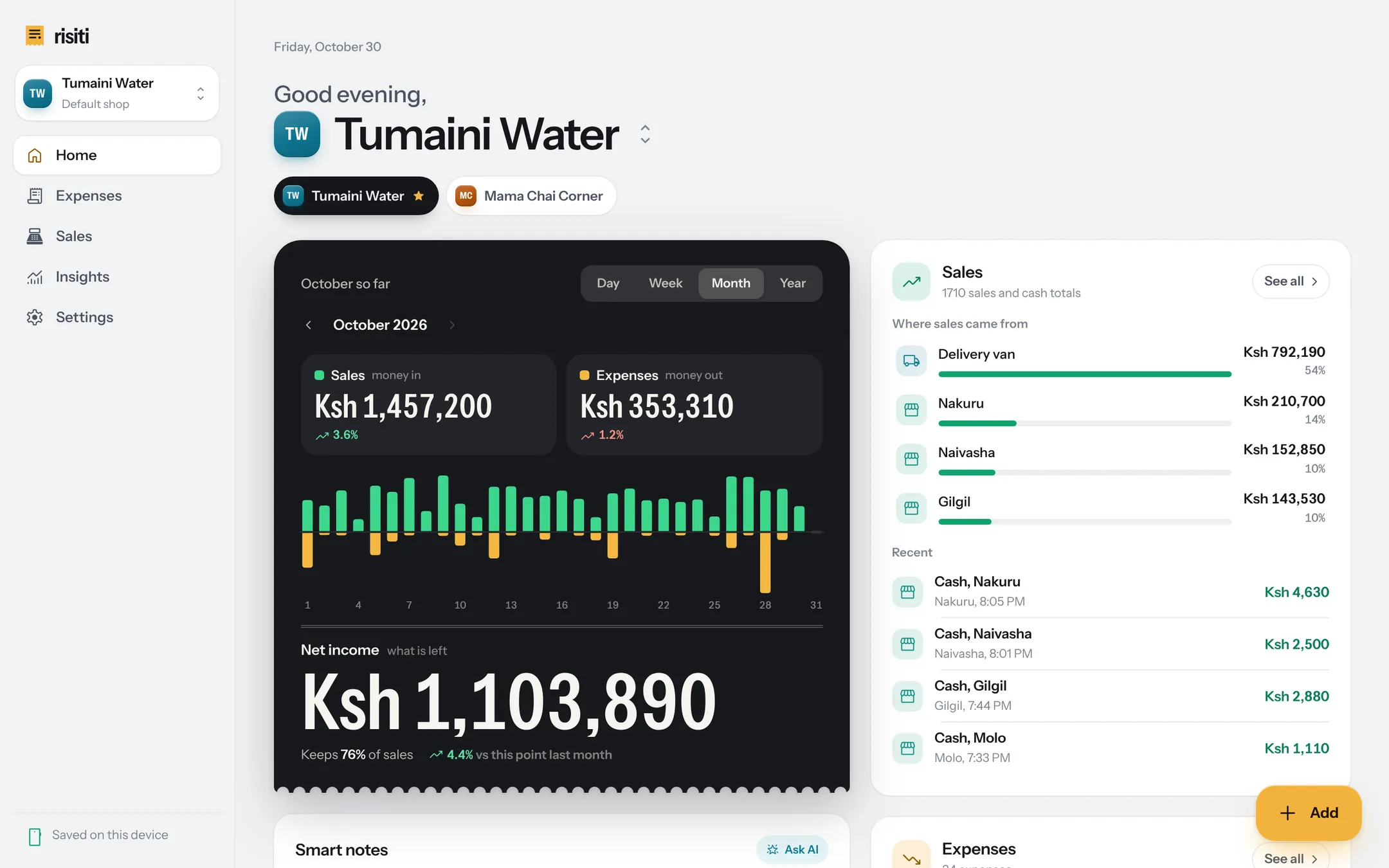
Home shows the month the way a till slip would: sales and expenses as line items, net income as the total. Tap Day, Week or Year to change the view.
Shops and selling points
Run one kiosk or ten stations. Each shop keeps its own products, prices and selling points, and each selling point gets its own daily, weekly and monthly totals.


Sales
Your team already reports in WhatsApp. Screenshot the group or export the chat, and Risiti reads every customer, item and payment and puts it on the right station or van.

Expenses
Photograph a receipt, upload a PDF or paste an M-Pesa message. The business, items, tax and category come out on their own; you confirm and it is filed.

Receipts for customers
When a school or a hotel asks for a receipt, make one in seconds and send it on WhatsApp, as a PDF or as an image.

Profit
Net income for the day, week, month or year, against the same point last time, with plain-language notes on what changed.

Who it is for
Built first for Kenyan shops that run on WhatsApp and M-Pesa. It works in any currency, with tax presets for 47 countries.
Privacy
The installed app needs no sign-up and keeps your records on your own device. Nothing about your business is sold, and nothing in Risiti is there to track you.
Shops, sales and expenses live in your browser's storage on your phone or computer, not on a Risiti server.
A receipt or screenshot you scan is read by AI through Risiti's reading service, and the result comes straight back. Risiti does not keep it, and the AI provider's terms do not let it train models on it.
No advertising and no analytics in the app, and your data is never sold.
Download a full backup or spreadsheets whenever you like, or delete everything from Settings.
The details are in the privacy policy.
Install
Risiti is a web app you install from the browser. There is no app store to search and no big download, and it keeps working when the network does not.
Once installed, Risiti opens and records sales and expenses without a connection. Reading photos and screenshots needs one.
Questions
No. Risiti shows money in, money out and what's left, in plain words. If you work with an accountant, download your sales and expenses as spreadsheets and send them over.
Yes. Paste an M-Pesa confirmation and it becomes an expense with the amount, who was paid and the transaction code. Till payments your staff post in WhatsApp become sales, and every sale can be marked cash, M-Pesa, till, card, bank or credit.
Yes, as many as you run. Each shop has its own products, selling points, receipts and numbers. Star the one that opens first and switch between them with one tap.
On your own device, in your browser's storage. When you scan something, it is sent to be read by AI and the result comes back; Risiti does not keep a copy.
The privacy policy has the details.
Yes. Once installed, Risiti opens, shows your numbers and records sales and expenses without a connection. Reading photos and screenshots needs one.
Download a full backup from Settings on the old phone and restore it on the new one. Because your records live on your device, keep a recent backup somewhere safe.
Yes. Mark an expense as Personal and it stays out of your shop's numbers, while Risiti still shows where your own money went.
Yes. Risiti works in any currency and has tax presets for 47 countries, from Kenya, Uganda, Tanzania, Rwanda and Nigeria to the UK, the US and India. Every shop keeps its own currency and time zone.
Start today
Open Risiti in your browser, set up your shop in three steps, and snap your first WhatsApp report.